

Enhanced QR Code Generator for .NET
Rounded modules and eyes, custom colors and a center logo, rendered as PNG from C# without third-party graphics libraries.
Branded QR Codes
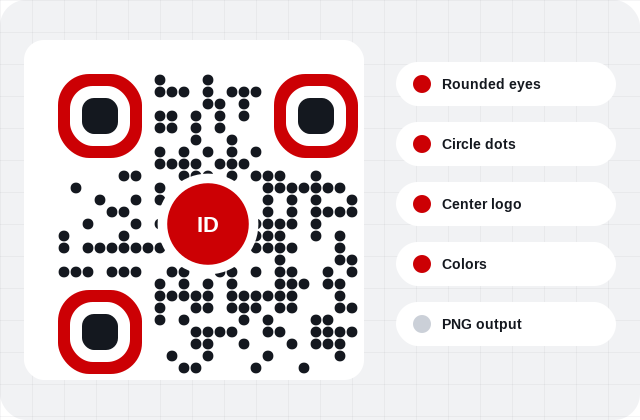
The enhanced renderer adds image-rendering capabilities to the existing QR Code functionality, so you can customize how generated QR Code images look.
- Rounded data modules and circular finder patterns, used together or independently
- Foreground, background and finder pattern colors from presets or hexadecimal values (#RGB, #RRGGBB or #AARRGGBB)
- A PNG logo in the center, loaded from a local logos folder or an HTTP/HTTPS URL, with a size setting (default 0.20)
- Existing encoding modes, versions and error correction levels continue to work
Standard QR Code as a PNG
The namespace is IDAutomation.NetStandard.QRCode.EnhancedEncoder and the class is QRCode. Supplying every optional parameter selects the byte-array overload, which returns the image directly with no await.
using IDAutomation.NetStandard.QRCode.EnhancedEncoder;

QRCode qr = new QRCode();

byte[] qrImage = qr.EncodeQR(
    "www.idautomation.com", true, EncodingModes.Byte,
    Versions.AUTO, ErrorCorrectionLevels.M, true, 2, 1);

File.WriteAllBytes("QRCode.png", qrImage);
Shapes and colors
Rounded modules and eyes
byte[] qrImage = await qr.EncodeQR(
    DataToEncode: "www.idautomation.com",
    ModuleSize: 10,
    RoundedModules: true,
    RoundedEyes: true);
RoundedModules affects the data modules; RoundedEyes renders the finder patterns as circular designs. Set either to false for squares.
Custom colors
byte[] qrImage = await qr.EncodeQR(
    DataToEncode: "www.idautomation.com",
    ModuleSize: 3,
    FgColor: QrColor.FromHex("#CC0007"),
    BgColor: QrColor.FromHex("#FFFFFF"),
    EyeFgColor: QrColor.FromHex("#000000"),
    EyeBgColor: QrColor.FromHex("#FFFFFF"));
Presets are Black, White, Transparent, Red, Blue and Green. Without separate eye colors, the finder patterns use the main colors.
A fully customized QR Code with a center logo
The logo is centered, scaled by LogoScale and placed over a white background area. Try 0.15 for smaller or 0.30 for larger.
byte[] qrImage = await qr.EncodeQR(
    DataToEncode: "https://www.idautomation.com",
    ErrorCorrectionLevel: ErrorCorrectionLevels.H,
    ModuleSize: 3,
    RoundedModules: true,
    RoundedEyes: true,
    LogoSource: "company-logo.png",   // PNG in the logos folder, or an https URL
    LogoScale: 0.20f);
Functions and parameters
| Parameter | Purpose |
|---|---|
| DataToEncode | Data to encode |
| ApplyTilde | Tilde processing for supported functions and special sequences |
| EncodingMode | Auto, Numeric, Alphanumeric or Byte |
| Version | QR Code version; AUTO selects one |
| ErrorCorrectionLevel | L, M, Q or H |
| BestMask / QuietZone / ModuleSize | Mask selection, blank border and pixel size of each module |
| RoundedModules / RoundedEyes | Rounded data modules and circular finder patterns |
| FgColor / BgColor | Colors of the data modules and background |
| EyeFgColor / EyeBgColor | Colors of the finder patterns |
| LogoSource / LogoScale | Logo PNG filename or URL, and its size relative to the symbol (default 0.20) |
| ImageFormat | Output format; the current renderer supports PNG |
The EncodeQR method returns a byte array through Task<byte[]>. See the Enhanced QR Code manual (opens in a new tab) for the complete signature.
logos folder.Frequently asked questions
What is the Enhanced QR Code?
An image-rendering addition to the .NET QR Code generator. It lets you change module shapes, finder pattern (eye) styles, colors and place a logo in the center of the symbol.
Does it need SkiaSharp or another graphics library?
No. It draws the symbol with its own pixel renderer and built-in PNG encoder, so no third-party graphics library is required.
Which output formats are supported?
The enhanced overload returns a PNG byte array only. Bitmap, vector and font output remain available through the standard QR Code methods.
Where can the logo come from?
A PNG file in the application’s logos directory, or an HTTP/HTTPS URL to a PNG. A logo that is unsupported or unavailable is skipped and the QR Code is still created.
Why do I get compiler error CS0121?
Some versions expose several EncodeQR overloads with optional parameters. Supply the parameters explicitly, as in the standard PNG example, so the compiler can choose one.
Will a logo affect scanning?
Larger logos and heavy styling can reduce readability. Test the images with the readers and devices you intend to use.
Make your QR Code stand out
Read the Enhanced QR Code documentation at IDAutomation.