

.NET Font Encoder for Barcode Fonts
The .NET Font Encoder Assembly and source code format text for IDAutomation barcode fonts in Visual Studio.
Encode, then apply the font
The encoder formats your data into text. When the barcode font is applied to that text, an accurate barcode is displayed.
- Free with a Developer License of any compatible font package
- Code 11, 128, 39, 93, Codabar, EAN-13 and EAN-8, GS1-128, ITF, MSI Plessey, RM4SCC, UPC-A and UPC-E, USPS IMb and Postnet
- Universal and GS1-128 fonts (functions start with
IDAutomation_Uni_) and GS1 DataBar fonts (IDAutomation_DataBar_) - C# and VB.NET source for .NET Standard, Core and Framework
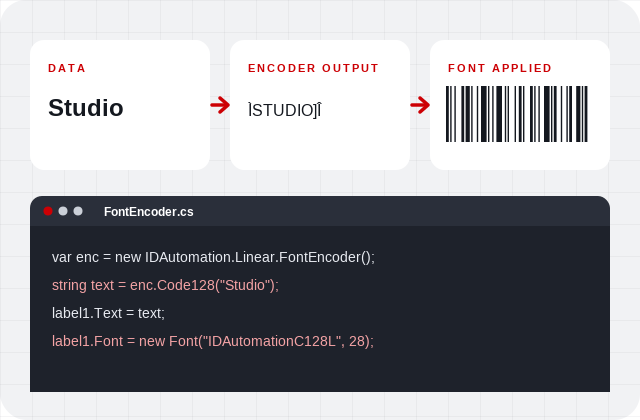
A Code 128 example in C#
Methods include Code128, Code39, Codabar, EAN13, UPCa and Postnet. Optional parameters include ApplyTilde, N_Dimension (2, 2.5 or 3), IncludeCheckDigit and Segments (default 22).
var enc = new IDAutomation.Linear.FontEncoder();
label1.Text = enc.Code128(txtDataToEncode.Text);
label1.Font = new Font("IDAutomationC128L", 28);
Five steps in Visual Studio
Summarized from IDAutomation’s .NET Barcode Font Encoder Assembly & Source Code (opens in a new tab) page.
- Copy the encoderCopy the IDAutomation.LinearFontEncoder.dll or the C#/VB.NET source file into your project.
- Add it to the projectUse Add Reference for the DLL, or Add Existing Item for the source file.
- Create the encoderCreate an instance of IDAutomation.Linear.FontEncoder.
- Encode the dataCall a method such as Code128 and assign the returned text to a text control.
- Set the fontSet the control font to the barcode font, for example IDAutomationC128L, and leave blank space around the barcode.
Frequently asked questions
What is the .NET Font Encoder Assembly?
A font encoder that formats text for IDAutomation barcode fonts in Microsoft .NET. It is free with a Developer License purchase for any compatible font package.
Which files are provided?
IDAutomation.LinearFontEncoder.dll for .NET Standard and Core, .NET Framework 4 and .NET Framework 2, and C# and VB.NET source for Standard, Core and Framework. Version 2021 and later DLLs are SHA256 signed with strong names.
What does the demo do?
The demo may show an intermittent pop-up, and demo fonts use “DEMO” or an S prefix such as IDAutomationSC128L. Replace the demo DLL with the licensed one.
What about 2D fonts?
The 2D fonts (Data Matrix, QR Code, PDF417 and DotCode) use separate assemblies supplied in the 2D font suites. See 2D font encoders.
Encode barcodes in Visual Studio
Choose a font package with a Developer License to receive the .NET encoder.